
More likely a IPhone permission configuration restrictionlionuser wrote: 07 May 2026, 13:21 Hi everyone,
I’m struggling with an issue on my Peugeot 508 II (Year 2022) regarding Apple CarPlay. Despite having a modern unit and the latest firmware, I cannot get CarPlay to work.
The Problem:
The Apple CarPlay icon is visible in the menu but stays permanently greyed out, even when a compatible iPhone is connected via an original Apple cable.
The iPhone charges when plugged in, but the NAC system doesn't trigger the CarPlay handshake (no permission pop-up on the phone).
My Setup / Steps already taken:
• Firmware Version: 44.07.33.32_NAC-r0 (Wave 4) - latest version installed.
• Hardware: Tested with multiple iPhones (Siri is ON, no restrictions) and several original Apple Lightning/USB-C cables.
• Battery: The car has a Varta EFB 70Ah battery. I recently fully charged it (external charger) and performed a BSI Reset (battery disconnect procedure), but the issue persists.
• System Reboot: Tried the 15-second "Phone" button hold for a NAC reboot—no change.
Question:
Does this look like a missing Telecoding (Configuration) issue? It feels like the "CarPlay" license is present but not correctly "activated" or provisioned in the NAC's internal config file.
Has anyone experienced with a greyed-out CarPlay icon?
Any help or technical insight would be greatly appreciated!
VIN: VR3**************[VIN obfuscated, can be read by forum staff]**************[VIN obfuscated, can be read by forum staff]**************[VIN obfuscated, can be read by forum staff]
PSA NAC RCC Updates
-
Solarriors
- Posts: 82
- Joined: 14 Nov 2025, 01:55
- x 2
Re: PSA NAC RCC Updates
-
Chiko002
- Posts: 16
- Joined: 09 Oct 2025, 15:19
- x 2
Re: PSA NAC RCC Updates
I have waw 2 system and the latest map 28.0.0.r0.
Is there anyway to get newer map? Because the current one is already one and a half years old.
Is there anyway to get newer map? Because the current one is already one and a half years old.
-
Solarriors
- Posts: 82
- Joined: 14 Nov 2025, 01:55
- x 2
Re: PSA NAC RCC Updates
I would still like to know if they have been hardware revisions within the C4 Spacetourer lines between 2016 and 2023
-
Boothy91
- Posts: 1
- Joined: 14 May 2026, 14:35
- x 1
Re: PSA NAC RCC Updates
Been trying to find info for Wave 2 for a while and seen this forum. Emailed Vauxhall the other day and got sent this as a reply. Quarters 2 and 4 will have map updates, so by the end of June, there should be an update.
Last edited by myglaren on 14 May 2026, 15:16, edited 1 time in total.
Reason: IMG tags
Reason: IMG tags
-
MKS1995
- Posts: 1
- Joined: 14 May 2026, 16:57
Re: PSA NAC RCC Updates
Hello,
My Peugeot E 2008 is showing software loading on demand, when i have downloaded the update from Peugeot the screen goes black and nothing happens, left the car on for over 10 hours and it just cycles round to blue and black screen
My Peugeot E 2008 is showing software loading on demand, when i have downloaded the update from Peugeot the screen goes black and nothing happens, left the car on for over 10 hours and it just cycles round to blue and black screen
-
Solarriors
- Posts: 82
- Joined: 14 Nov 2025, 01:55
- x 2
Re: PSA NAC RCC Updates
@RuiBoothy91 wrote: 14 May 2026, 14:38 Been trying to find info for Wave 2 for a while and seen this forum. Emailed Vauxhall the other day and got sent this as a reply. Quarters 2 and 4 will have map updates, so by the end of June, there should be an update.
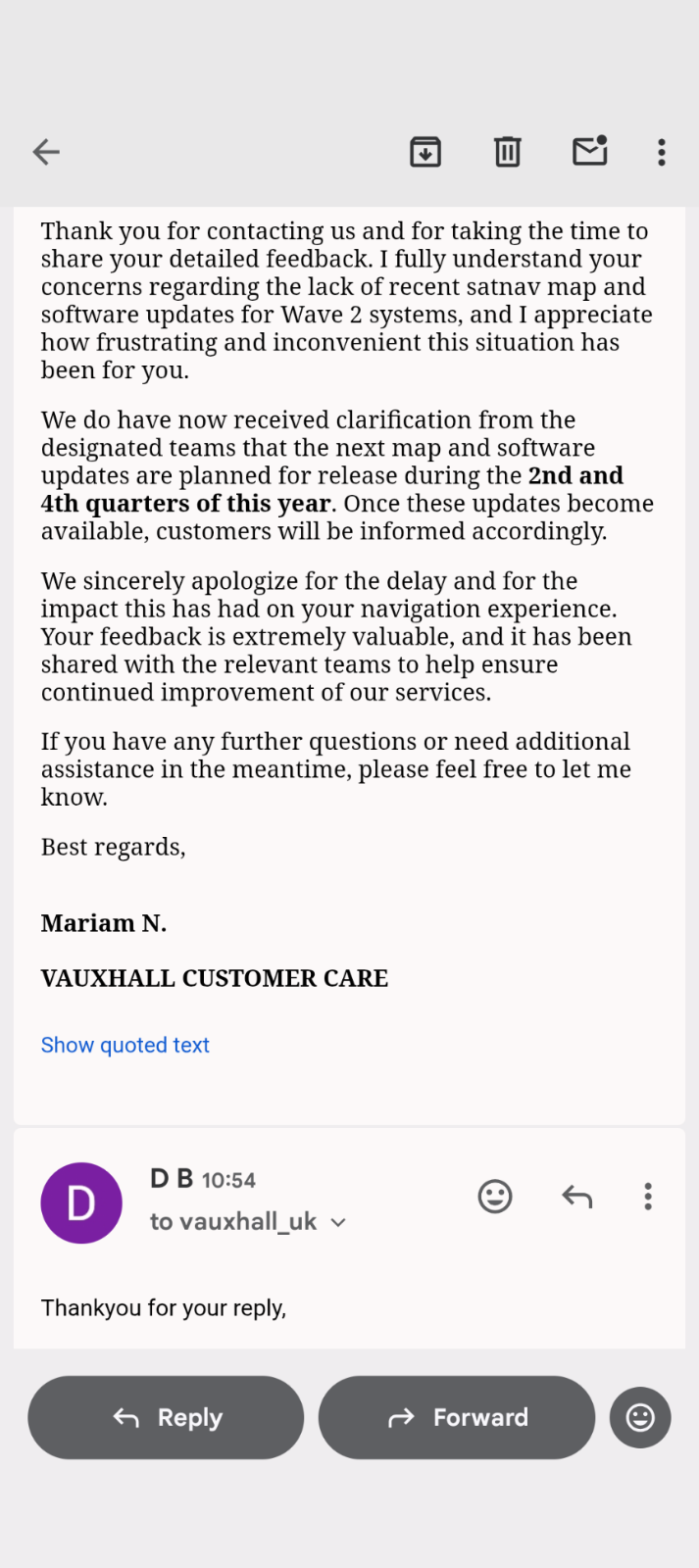
If this is true Rui, the Wave 2 getting updates, then how can we feedback to Continental for fixing the wheel scroll functions and the Android Auto size and the car info placement on the 12" screen ?
-
sadikerd
- Posts: 2
- Joined: 31 May 2026, 22:22
- x 2
Re: PSA NAC RCC Updates
Hey! I still get an issue to update my citroen e-c4 2022 "Software of the touch screen".
My Current version is 43.04.27.52_NAC-r0
Citroen update app suggests me: 44.06.44.22_NAC-r0
I followed this:
1. I downloaded 44.07.33.32_NAC-r0 from internet (not @Rui's website. Because it downloads super super slow there. I searched and found on google)
2. I've formated the USB key to fat32 (normal windows formatter)
3. I've exported tar file to USB by 7zip app.
4. I also downloaded licence file from the Rui's link. (i copied my uin number from exisinting uptade file from "citroen update" app) and copied into USB key.
5. i have SWL folder, UpdateInfo file, and license including license file folder.
6. I also connected the car to wifi.
I tried everyhing what i read in this form.
But i still get hardware being incompatible
Where do i make mistake?
My Current version is 43.04.27.52_NAC-r0
Citroen update app suggests me: 44.06.44.22_NAC-r0
I followed this:
1. I downloaded 44.07.33.32_NAC-r0 from internet (not @Rui's website. Because it downloads super super slow there. I searched and found on google)
2. I've formated the USB key to fat32 (normal windows formatter)
3. I've exported tar file to USB by 7zip app.
4. I also downloaded licence file from the Rui's link. (i copied my uin number from exisinting uptade file from "citroen update" app) and copied into USB key.
5. i have SWL folder, UpdateInfo file, and license including license file folder.
6. I also connected the car to wifi.
I tried everyhing what i read in this form.
But i still get hardware being incompatible
Where do i make mistake?
Last edited by sadikerd on 31 May 2026, 23:14, edited 1 time in total.
-
Sloppysod

- Moderating Team
- Posts: 1416
- Joined: 23 May 2015, 23:35
- x 365
Re: PSA NAC RCC Updates
It looks to me that your USB drive is not recognised, what size is your USB drive and are you sure its fat32, as 'normal windows formatter' formats large Drives as ntfs by default?sadikerd wrote: 31 May 2026, 22:44
2. I've formated the USB key to fat32 (normal windows formatter)
........hardware being incompatible......
 ......
Try shrinking the volume to just over the size of the update files.
Stu 
"Some cause happiness wherever they go, others whenever they go"Oscar Wilde (1854-1900)

"Some cause happiness wherever they go, others whenever they go"Oscar Wilde (1854-1900)
-
sadikerd
- Posts: 2
- Joined: 31 May 2026, 22:22
- x 2
Re: PSA NAC RCC Updates
Hi!
I got the issue why it doesn't install the firmware! It was wrong package that i downloaded.
In internet, there are two available download links for the 44.07.33.32 firmware:
This is working one => https://majestic-web.mpsa.com/nas/eu/mj ... _WAVE4.tar
This is NOT WORKING => https://ds4emloty3shq.cloudfront.net/CO ... _WAVE4.tar
The first one (working one) was so slow to download, then i downloaded from second link since thay have same name/version. But it was a mistake. The second one has "hardware mismatch" issue!
If you are in same case, just patient and download the first one.
I got the issue why it doesn't install the firmware! It was wrong package that i downloaded.
In internet, there are two available download links for the 44.07.33.32 firmware:
This is working one => https://majestic-web.mpsa.com/nas/eu/mj ... _WAVE4.tar
This is NOT WORKING => https://ds4emloty3shq.cloudfront.net/CO ... _WAVE4.tar
The first one (working one) was so slow to download, then i downloaded from second link since thay have same name/version. But it was a mistake. The second one has "hardware mismatch" issue!
If you are in same case, just patient and download the first one.